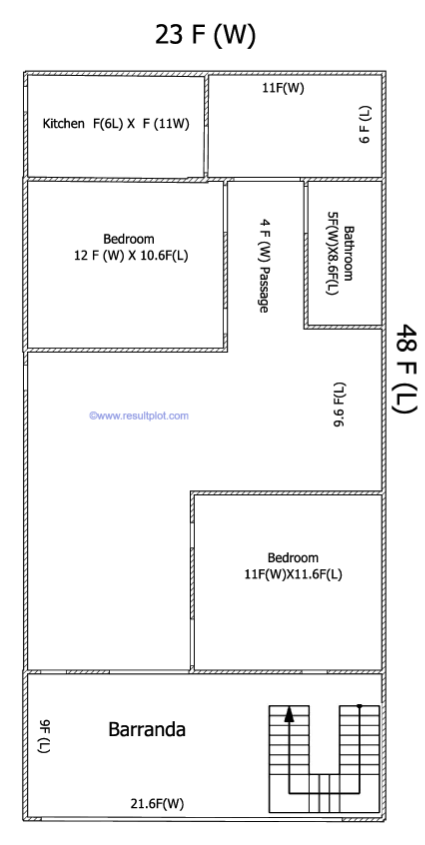
1104 SQ Feet- 48X23 (F) House Plan

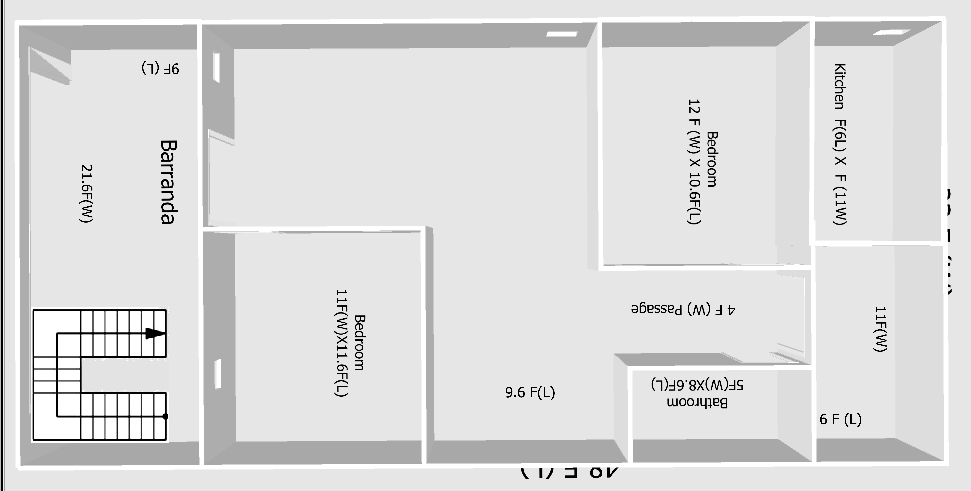
यह फ़्लोर प्लान एक 2 बेडरूम वाले House Plan का खाका दर्शाता है, जिसका कुल माप बाहर से 23 फ़ीट (W) चौड़ाई में और 48 फ़ीट (L) लंबाई में है।

फ्लोर प्लान का विवरण (Description of the Floor Plan)

यह फ्लोर प्लान एक घर या अपार्टमेंट के लेआउट को दर्शाता है। यहाँ विभिन्न कमरों के माप (dimensions) दिए गए हैं:

दो बेडरूम (Two Bedrooms):

    • पहला बेडरूम: इसकी माप 12 फीट (चौड़ाई) X10.6 फीट (लंबाई) है।
    • दूसरा बेडरूम: इसकी माप 11 फीट (चौड़ाई) X11.6 फीट (लंबाई) है।
  • किचन (Kitchen):
    • किचन की माप 6 फीट (लंबाई) X11 फीट (चौड़ाई) है।
  • बाथरूम (Bathroom):
    • बाथरूम की माप 5 फीट (चौड़ाई) X8.6 फीट (लंबाई) है।
  • बरांडा/वरांडा (Veranda):
    • घर के सामने एक बड़ा बरांडा है जिसकी चौड़ाई 21.6 फीट है, और बाईं ओर की लंबाई 9.5 फीट है।
  • पैसेज (Passage):
    • एक 4 फीट (चौड़ाई) का पैसेज (रास्ता) है जो कमरों को जोड़ता है।
    • एक अन्य पैसेज की लंबाई 3.6 फीट है।
  • स्टेयरकेस (Staircase):
    • बरांडा के पास U-आकार की सीढ़ियाँ (Staircase) ऊपर जाने के लिए दिखाई गई हैं।
  • अन्य क्षेत्र (Other Areas):
    • ऊपर दाईं ओर 11 फीट (चौड़ाई) का एक और क्षेत्र है, जिसके साथ 9 फीट (लंबाई) का एक छोटा सा स्थान है।

अब इस Plan को दूसरे Angle से देखे :


810 SQ Feet-90 Yards House Plan

810 SQ Feet house design

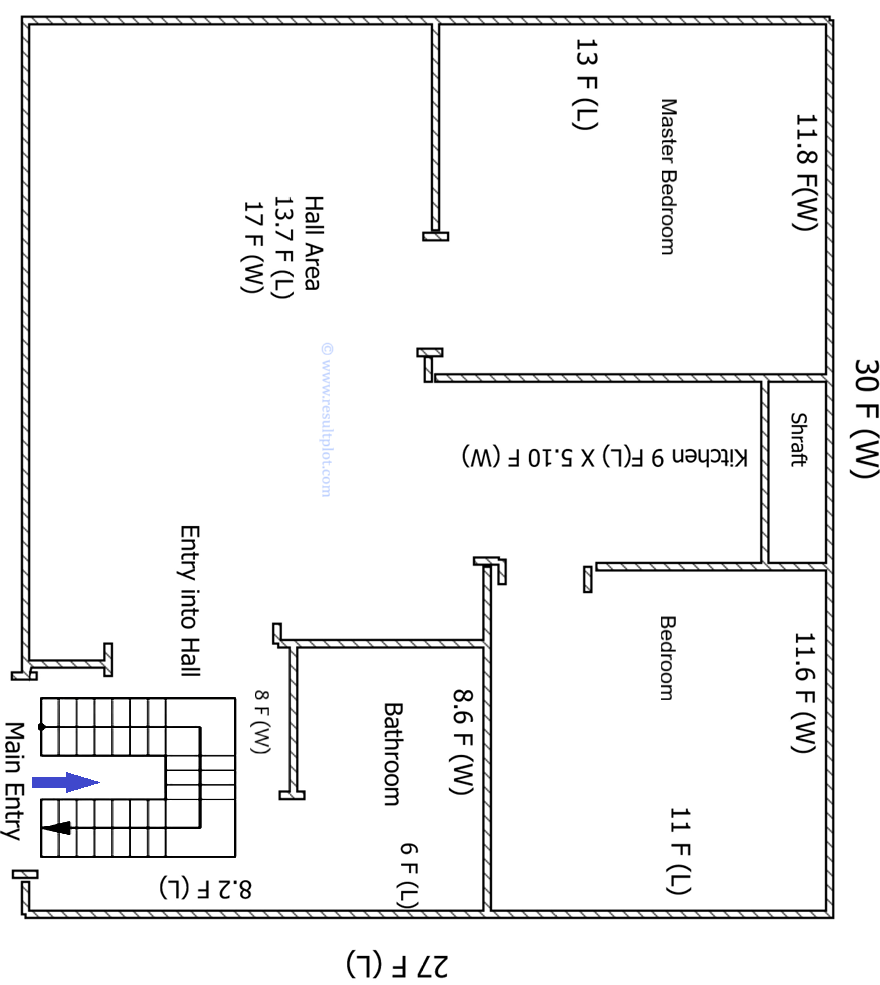
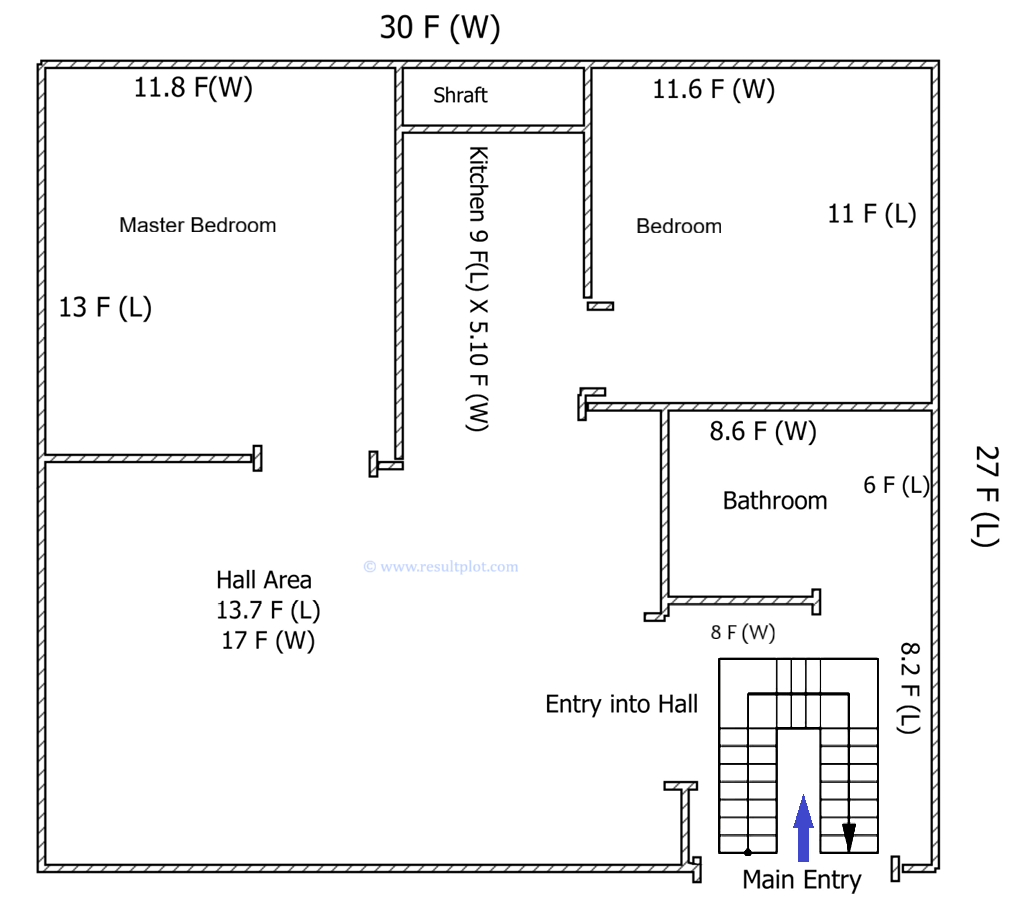
यह फ़्लोर प्लान एक 2 बेडरूम वाले अपार्टमेंट का खाका दर्शाता है, जिसका कुल माप बाहर से 30 फ़ीट (W) चौड़ाई में और 27 फ़ीट (L) लंबाई में है। मुख्य प्रवेश द्वार (Main Entry) से अंदर आने पर सबसे पहले सीढ़ियों वाला एक क्षेत्र आता है, जिसका माप 8 फ़ीट (W) चौड़ाई और 8.2 फ़ीट (L) लंबाई है। इसके तुरंत बाद, एक छोटा दरवाज़ा हॉल में प्रवेश कराता है, जिसे Hall Area कहा गया है।

कमरों और क्षेत्रों का विवरण:810 SQ Feet house design

हॉल एरिया काफी बड़ा है, जिसका माप 17 फ़ीट (W) चौड़ाई और 13.7 फ़ीट (L) लंबाई है। हॉल के एक तरफ मास्टर बेडरूम है, जिसकी चौड़ाई 11.8 फ़ीट (W) और लंबाई 13 फ़ीट (L) है। हॉल के ऊपरी-मध्य भाग में किचन दिया गया है, जिसका माप 9 फ़ीट (L) लंबाई और 5.10 फ़ीट (W) चौड़ाई है। किचन के पास ही एक छोटा शाफ़्ट का क्षेत्र भी दिया गया है।

अन्य क्षेत्रों का विवरण

हॉल से आगे, दाहिनी तरफ बाथरूम का प्रवेश द्वार है। बाथरूम का माप 8.6 फ़ीट (W) चौड़ाई और 6 फ़ीट (L) लंबाई है। बाथरूम के ठीक ऊपर की तरफ दूसरा बेडरूम स्थित है। इस बेडरूम का माप 11.6 फ़ीट (W) चौड़ाई और 11 फ़ीट (L) लंबाई है। इस तरह, यह योजना एक फंक्शनल और दो बेडरूम वाला लेआउट प्रस्तुत करती है।

Computer & Processor : AN Introduction

https://www.resultplot.com/

www.resultplot.com

A computer is a machine or an electronic device that takes input (instructions/data) from you, processes that input, and then gives you output (results). It is composed of several parts:

  • Input Devices: Such as the keyboard, mouse, through which you provide data.
  • Processing Unit: This is your processor (CPU), which does the real work.
  • Storage Devices: Such as RAM and hard drive, where data is stored.
  • Output Devices: Such as the monitor, speakers, printer, through which you receive the results.

The Processor (CPU):

The Processor (also called CPU or Central Processing Unit) is a small chip that is called the Brain of the computer. Its main function is to understand, calculate, and complete every instruction given to the computer. When you click a mouse, play a game, or type something, the processor handles all that work.

Main Functions of the Processor:

  1. Fetch: Takes the instruction from memory.
  2. Decode: Understands what task needs to be performed.
  3. Execute: Completes the task by performing arithmetic, logical, and control calculations.
  4. Writeback: Sends the result back to memory.

The “First Computer”

Which was the “first computer” depends on which definition of a computer you use—whether it was mechanical, programmable, or electronic.

  1. The Father of Mechanical Computers: Charles Babbage

Charles Babbage is widely regarded as the “Father of the Computer.”

  • Difference Engine:
    • Time and Contribution: 1820s. It was an automatic, mechanical calculator designed to create accurate mathematical tables. It was steam-powered and built to reduce errors.
  • Analytical Engine: 1830s, and it was his most important invention. It was the first design that contained all the fundamental parts of today’s computers:
    • Mill: Which performed calculations like today’s CPU (Central Processing Unit).
    • Store: Which held data like Memory.
    • Input/Output: Via Punch Cards.
    • It is considered the first General-Purpose computer design, although Babbage could not fully build it in his lifetime.

Ada Lovelace: She wrote notes for Babbage’s Analytical Engine and created an Algorithm. For this reason, she is recognized as the First Computer Programmer in the world.

  1. The First Electronic Digital Computer: ENIAC (Electronic Numerical Integrator and Computer)

The modern computing era began with electronic computers, and the ENIAC is the most significant in this category. Its construction began in 1943 and was completed in 1945 (publicly announced in 1946). It was the first fully electronic, programmable digital computer. It used Vacuum Tubes for calculation (approximately 18,000). It was 50 feet long, weighed 30 tons, and occupied the space of a large room. It was used by the US Army to calculate artillery firing tables.

The Concept of Program Storage: EDVAC (Electronic Discrete Variable Automatic Computer): After the ENIAC, Mauchly and Eckert worked on the EDVAC with John von Neumann.

  • Contribution: EDVAC introduced the concept of the “Stored-Program Architecture,” meaning the computer could store both the program and the data in the same memory. This principle is still the foundation of every modern computer (your laptop or phone) today.
  • If you talk about the ‘Father’: it is Charles Babbage.
  • If you talk about the ‘First Programmable Electronic Computer’: it was ENIAC.

See this Post in Hindi : कंप्यूटर और प्रोसेसर: एक परिचय

Generations of Computers:

The development of the computer so far has been mainly divided into Five Generations. Each generation represents a major technological leap that completely changed the size, speed, and capability of the computer.

  1. First Generation (1940s – 1950s)
  • Main Technology: Vacuum Tubes
  • Characteristics:
    • These computers were very large (occupying an entire room).
    • They were very slow and generated a lot of Heat.
    • Their use was mainly for scientific and engineering calculations.
  • Examples: ENIAC, EDVAC, UNIVAC.
  1. Second Generation (1950s – 1960s)
  • Main Technology: Transistors
  • Characteristics:
    • Transistors were smaller, faster, cheaper, and generated less heat compared to vacuum tubes.
    • Computer size decreased and processing speed increased.
    • The use of Assembly Language and early High-Level Languages like FORTRAN and COBOL began.
  • Examples: IBM 7000 series, CDC 1604.
  1. Third Generation (1960s – 1970s)
  • Main Technology: Integrated Circuits (ICs) or Chips
  • Characteristics:
    • Many transistors, resistors, and capacitors were packed onto a tiny silicon chip (an IC). This made the speed very fast and reduced the cost.
    • Computer size became even smaller (e.g., desktop or mini-computers).
    • The use of Operating Systems began, allowing multiple programs to run at the same time.
  • Examples: IBM 360 series, DEC PDP-8.
  1. Fourth Generation (1970s – 2010s)
  • Main Technology: Very Large Scale Integration (VLSI) or Microprocessor
  • Characteristics:
    • Thousands of ICs were fitted onto a single chip, leading to the development of the Microprocessor Chip. This put the computer’s entire Central Processing Unit (CPU) onto one chip.
    • This led to the Personal Computer (PC) Revolution.
    • The development of the Internet, Graphical User Interface (GUI), and computer networking occurred.
  • Examples: IBM PC, Apple Macintosh, computers with Intel Pentium chips.
  1. Fifth Generation (2010s – Present)
  • Main Technology: Artificial Intelligence (AI), Parallel Processing, and ULSI (Ultra Large Scale Integration)
  • Characteristics:
    • The main goal of this generation is to develop computing systems that can react like the human brain, such as: Artificial Intelligence (AI), Machine Learning (ML), and Deep Learning.
    • Use of parallel processing and superconductor technology to increase computer performance.
    • Research in Voice Recognition, natural language understanding, and Quantum Computing.
  • Examples: Robotics, Neural Networks, Smartphones, and today’s AI-powered systems.

Thus, the computer has gone through five major technological transformations, from vacuum tubes to today’s powerful AI-based systems.

Generations of CPU (Central Processing Unit):

Like computers, the development of the CPU (Central Processing Unit) is also divided into generations, but this division is based on the major changes in the Architecture and design by CPU manufacturing companies like Intel or AMD. Broadly speaking, the CPU’s development is counted from the advent of the first microprocessor in the 1970s, which became the foundation of the fourth generation of computers.

Here is a division of CPU generations based on key technological changes:

Major Generations of Microprocessor CPUs

CPU generations are usually counted based on the following technology:

  1. First Microprocessor Generation (1970s): 4-bit and 8-bit CPU
  • Main Change: Bringing the entire CPU onto a single chip (Microprocessor).
  • Characteristics: 4-bit to 8-bit data processing. Very few transistors.
  • Examples: Intel 4004 (the first commercial microprocessor in 1971), Intel 8080.
  1. Second Generation (1970s – 1980s): 16-bit CPU
  • Main Change: 16-bit processing, which increased data handling capacity.
  • Characteristics: Instrumental in the development of the Personal Computer (PC).
  • Examples: Intel 8086, Motorola 68000.
  1. Third Generation (1980s – 1990s): 32-bit CPU (The x86 Era Begins)
  • Main Change: 32-bit Architecture (IA-32), which made modern Operating Systems (like Windows and Mac OS) possible.
  • Characteristics: Introduction of Cache Memory, better speed.
  • Examples: Intel 80386, Intel 80486, and early Pentium processors.
  1. Fourth Generation (1990s – 2000s): Pipelining and High-Speed Clock
  • Main Change: Complex instruction Pipelining and high Clock Speed (measured in GHz).
  • Characteristics: Better capacity to handle multimedia and 3D graphics.
  • Examples: Intel Pentium II / III / 4 (NetBurst Architecture).
  1. Fifth Generation (2000s – 2010s): Multi-Core Revolution
  • Main Change: Instead of increasing clock speed, adding more than one processing core (Dual-Core, Quad-Core) onto the same chip.
  • Characteristics: 64-bit Architecture (x86-64) became the standard. Focus on reducing power consumption.
  • Examples: Intel Core 2 Duo, early Intel Core i-series (i3, i5, i7), AMD Athlon 64.
  1. Sixth Generation (2010s – Present): Integrated Graphics and Optimization
  • Main Change: Integrating the CPU and Graphics Processing Unit (GPU) onto a single chip (APU).
  • Characteristics: Better performance per watt, efficient designs for laptops. Continuous architectural improvements in the Intel Core i-Series (e.g., Skylake, Kaby Lake, etc.) and the rise of AMD Ryzen.
  • Examples: All current Intel Core i9/i7/i5/i3 and AMD Ryzen processors.

There is no fixed international rule for counting the generations of CPUs. It depends on technological innovation. However, from the first microprocessor (1970s) to today’s multi-core, 64-bit, AI-centric chips, the CPU has gone through approximately six major generations of technological change.

We will learn about the different types of processors in the next post.

by Result Plot
कंप्यूटर और प्रोसेसर: एक परिचय

https://www.resultplot.com/

www.resultplot.com

कंप्यूटर एक मशीन या इलेक्ट्रॉनिक उपकरण है जो आपसे इनपुट (निर्देश/डेटा) लेता है, उस इनपुट को प्रोसेस करता है, और फिर आपको आउटपुट (परिणाम) देता है। यह कई हिस्सों से मिलकर बनता है:

  • इनपुट डिवाइस (Input Devices): जैसे कीबोर्ड, माउस, जिनसे आप डेटा देते हैं।
  • प्रोसेसिंग यूनिट (Processing Unit): यही आपका प्रोसेसर (CPU) है, जो असली काम करता है।
  • स्टोरेज डिवाइस (Storage Devices): जैसे RAM और हार्ड ड्राइव, जहाँ डेटा स्टोर होता है।
  • आउटपुट डिवाइस (Output Devices): जैसे मॉनिटर, स्पीकर, प्रिंटर, जिनसे आपको परिणाम मिलता है।

प्रोसेसर जिसे CPU या Central Processing Unit भी कहते हैं) एक छोटी सी चिप होती है जो कंप्यूटर का दिमाग (Brain) कहलाती है।इसका मुख्य काम कंप्यूटर को दिए गए हर निर्देश को समझना, गणना करना और उसे पूरा करना है। जब आप माउस क्लिक करते हैं, कोई गेम खेलते हैं, या कोई टाइप करते हैं, तो यह सारा काम प्रोसेसर ही करता है।

प्रोसेसर के मुख्य कार्य:

  • निर्देशों को लेना (Fetch): मेमोरी से निर्देश लेता है।
  • समझना (Decode): यह समझता है कि कौन सा काम करना है।
  • कार्य करना (Execute): यह अंकगणितीय, तार्किक या नियंत्रण (arithmetic, logical, and control) संबंधी गणनाएँ करके उस काम को पूरा करता है।
  • परिणाम देना (Writeback): परिणाम को वापस मेमोरी में भेजता है।

इस पोस्ट को अंग्रेजी में देखें : Computer & Processor : AN Introduction

सबसे पहला कंप्यूटर” कौन सा था, यह इस बात पर निर्भर करता है कि आप कंप्यूटर की किस परिभाषा का उपयोग कर रहे हैं—क्या यह यांत्रिक , प्रोग्रामेबल , या इलेक्ट्रॉनिक था।

  1. यांत्रिक (Mechanical) कंप्यूटर के जनक : चार्ल्स बैबेज इन्हें व्यापक रूप से “आधुनिक कंप्यूटर का जनक” (Father of the Computer) माना जाता है।
  • डिफरेंस इंजन (Difference Engine):
    • समय और योगदान : 1820 का दशक।यह एक स्वचालित, यांत्रिक कैलकुलेटर था जिसे सटीक गणितीय सारणी (mathematical tables) बनाने के लिए डिज़ाइन किया गया था। यह भाप से चलने वाला था और त्रुटियों को कम करने के लिए बनाया गया था।
    • एनालिटिकल इंजन (Analytical Engine): 1830 का दशक और यह उनका सबसे महत्वपूर्ण आविष्कार था। यह पहला ऐसा डिज़ाइन था जिसमें आज के कंप्यूटर के सभी मूलभूत हिस्से थे:
  • मिल (Mill): जो आज के CPU (सेंट्रल प्रोसेसिंग यूनिट) की तरह गणना करता था और जो मेमोरी की तरह डेटा रखता था।
  • इनपुट/आउटपुट: पंच कार्ड्स (Punch Cards) के माध्यम से।
    • इसे पहला जनरल-पर्पस (सामान्य उद्देश्य वाला) कंप्यूटर डिज़ाइन माना जाता है, हालांकि इसे बैबेज अपने जीवनकाल में पूरी तरह से बना नहीं पाए थे।

एडा लवलेस (Ada Lovelace) इन्होंने बैबेज के एनालिटिकल इंजन के लिए नोट्स लिखे थे और एक एल्गोरिथम (Algorithm) बनाया था। इसी कारण उन्हें दुनिया की पहली कंप्यूटर प्रोग्रामर (First Computer Programmer) के रूप में पहचान मिली।


  1. पहला इलेक्ट्रॉनिक डिजिटल कंप्यूटर :ENIAC (Electronic Numerical Integrator and Computer)

आधुनिक कंप्यूटिंग युग की शुरुआत इलेक्ट्रॉनिक कंप्यूटरों से हुई, और इस श्रेणी में ENIAC सबसे महत्वपूर्ण है। इसका निर्माण 1943 में शुरू हुआ और 1945 में बनकर तैयार हुआ (1946 में सार्वजनिक रूप से घोषित)।यह पहला पूरी तरह से इलेक्ट्रॉनिक, प्रोग्रामेबल डिजिटल कंप्यूटर था।इसने गणना के लिए वैक्यूम ट्यूब्स (Vacuum Tubes) का इस्तेमाल किया (लगभग 18,000)।यह 50 फीट लंबा, 30 टन वजनी था और एक बड़े कमरे जितना स्थान घेरता था।इसका उपयोग अमेरिकी सेना के लिए आर्टिलरी फायरिंग टेबल की गणना करने के लिए किया गया था।

प्रोग्राम स्टोरेज की अवधारणा : EDVAC (Electronic Discrete Variable Automatic Computer): ENIAC के बाद, मौचली और एकर्ट ने जॉन वॉन न्यूमैन  के साथ मिलकर EDVAC पर काम किया।योगदान: EDVAC ने “स्टोर्ड-प्रोग्राम आर्किटेक्चर” (Stored-Program Architecture) की अवधारणा पेश की, जिसका अर्थ है कि कंप्यूटर प्रोग्राम और डेटा दोनों को एक ही मेमोरी में स्टोर कर सकता है। यह सिद्धांत आज भी हर आधुनिक कंप्यूटर (आपके लैपटॉप या फ़ोन) की नींव है।

  • अगर आप ‘जनक’ की बात करें: तो वह चार्ल्स बैबेज हैं।
  • अगर आप ‘पहला प्रोग्रामेबल इलेक्ट्रॉनिक कंप्यूटर’ की बात करें: तो वह ENIAC था।

कंप्यूटर की  पीढ़ियाँ ( Generations of Computers)

अब तक कंप्यूटर के विकास को मुख्य रूप से पाँच पीढ़ियों (Five Generations) में विभाजित किया गया है। प्रत्येक पीढ़ी एक बड़ी तकनीकी छलांग को दर्शाती है जिसने कंप्यूटर के आकार, गति और क्षमता को पूरी तरह से बदल दिया।

  1. पहली पीढ़ी (First Generation: 1940s – 1950s)
  • मुख्य तकनीक: वैक्यूम ट्यूब्स (Vacuum Tubes)
  • विशेषताएँ: विशेषताएँ कुछ इस प्रकार हैं
    • ये कंप्यूटर बहुत बड़े होते थे (पूरा कमरा घेर लेते थे)।
    • इनकी गति बहुत धीमी थी और ये बहुत ज़्यादा गर्मी (Heat) पैदा करते थे।
    • इनका उपयोग मुख्य रूप से वैज्ञानिक और इंजीनियरिंग गणनाओं के लिए होता था।
  • उदाहरण: ENIAC, EDVAC, UNIVAC।
  1. दूसरी पीढ़ी (Second Generation: 1950s – 1960s)
  • मुख्य तकनीक: ट्रांजिस्टर (Transistors)
  • विशेषताएँ: विशेषताएँ कुछ इस प्रकार हैं
    • ट्रांजिस्टर वैक्यूम ट्यूब्स की तुलना में छोटे, तेज़, सस्ते और कम गर्मी पैदा करने वाले थे।
    • कंप्यूटर का आकार छोटा हुआ और प्रोसेसिंग गति बढ़ी।
    • असेंबली भाषा (Assembly Language) और शुरुआती उच्च-स्तरीय प्रोग्रामिंग भाषाएँ (High-Level Languages) जैसे FORTRAN और COBOL का उपयोग शुरू हुआ।
  • उदाहरण: IBM 7000 सीरीज, CDC 1604।
  1. तीसरी पीढ़ी (Third Generation: 1960s – 1970s)
  • मुख्य तकनीक: एकीकृत सर्किट (Integrated Circuits – ICs) या चिप्स
  • विशेषताएँ: विशेषताएँ कुछ इस प्रकार हैं
    • एक IC में कई ट्रांजिस्टर, रेसिस्टर और कैपेसिटर को एक छोटे से सिलिकॉन चिप पर पैक किया गया। इससे गति बहुत तेज़ हुई और लागत कम हुई।
    • कंप्यूटर का आकार और छोटा हो गया (जैसे डेस्कटॉप या मिनी-कंप्यूटर)।
    • ऑपरेटिंग सिस्टम (Operating System) का उपयोग शुरू हुआ, जिससे एक ही समय में कई प्रोग्राम चलाए जा सकते थे।
  • उदाहरण: IBM 360 सीरीज, DEC PDP-8।
  1. चौथी पीढ़ी (Fourth Generation: 1970s – 2010s)
  • मुख्य तकनीक: वृहद स्तरीय एकीकरण (Very Large Scale Integration – VLSI) या माइक्रोप्रोसेसर (Microprocessor)
  • विशेषताएँ:
    • हजारों ICs को एक ही चिप पर फिट किया गया, जिससे माइक्रोप्रोसेसर चिप (Microprocessor Chip) का विकास हुआ। यह कंप्यूटर के पूरे सेंट्रल प्रोसेसिंग यूनिट (CPU) को एक चिप पर ले आया।
    • इससे पर्सनल कंप्यूटर (PC) क्रांति आई।
    • इंटरनेट, ग्राफिकल यूजर इंटरफेस (GUI), और कंप्यूटर नेटवर्किंग का विकास हुआ।
  • उदाहरण: IBM PC, Apple Macintosh, Intel Pentium चिप्स वाले कंप्यूटर।
  1. पाँचवीं पीढ़ी (Fifth Generation: 2010s – वर्तमान)
  • मुख्य तकनीक: कृत्रिम बुद्धिमत्ता (Artificial Intelligence – AI), समांतर प्रोसेसिंग (Parallel Processing), और ULSI (Ultra Large Scale Integration)
  • विशेषताएँ: विशेषताएँ कुछ इस प्रकार हैं
    • इस पीढ़ी का मुख्य लक्ष्य ऐसी कंप्यूटिंग प्रणालियाँ विकसित करना है जो मानव मस्तिष्क की तरह प्रतिक्रिया दे सकें, जैसे: आर्टिफिशियल इंटेलिजेंस (AI), मशीन लर्निंग (ML) और डीप लर्निंग।
    • कंप्यूटर का प्रदर्शन बढ़ाने के लिए पैरेलल प्रोसेसिंग और सुपरकंडक्टर तकनीक का उपयोग।
    • वॉयस रिकग्निशन, प्राकृतिक भाषा को समझना, और क्वांटम कंप्यूटिंग पर शोध।
  • उदाहरण: रोबोटिक्स, न्यूरल नेटवर्क्स, स्मार्टफोन्स, और आज के AI-संचालित सिस्टम।

इस प्रकार, कंप्यूटर ने वैक्यूम ट्यूबों से लेकर आज के शक्तिशाली AI-आधारित सिस्टम तक, पाँच प्रमुख तकनीकी परिवर्तनों को पार किया है।


CPU (सेंट्रल प्रोसेसिंग यूनिट) की  पीढ़ियाँ ( Generations of CPU)

कंप्यूटर की तरह, CPU (सेंट्रल प्रोसेसिंग यूनिट) के विकास को भी पीढ़ियों (Generations) में बाँटा जाता है, लेकिन यह विभाजन CPU बनाने वाली कंपनियों, जैसे Intel या AMD, के आर्किटेक्चर (Architecture) और डिज़ाइन में आए बड़े बदलावों पर आधारित होता है।व्यापक रूप से देखा जाए, तो CPU के विकास को मुख्य रूप से 1970 के दशक में पहले माइक्रोप्रोसेसर के आने के बाद से गिना जाता है, जो चौथी पीढ़ी के कंप्यूटर की नींव बना।यहाँ प्रमुख तकनीकी बदलावों के आधार पर CPU की पीढ़ियों का विभाजन दिया गया है:

माइक्रोप्रोसेसर CPU की प्रमुख पीढ़ियाँ

CPU की पीढ़ियों को आमतौर पर निम्नलिखित तकनीक के आधार पर गिना जाता है:

  1. पहली माइक्रोप्रोसेसर पीढ़ी (1970s): 4-बिट और 8-बिट CPU
  • मुख्य बदलाव: पूरे CPU को एक ही चिप (माइक्रोप्रोसेसर) पर लाना।
  • विशेषताएँ: 4-बिट से 8-बिट डेटा प्रोसेसिंग। बहुत कम ट्रांजिस्टर।
  • उदाहरण: Intel 4004 (1971 में पहला कमर्शियल माइक्रोप्रोसेसर), Intel 8080।
  1. दूसरी पीढ़ी (1970s – 1980s): 16-बिट CPU
  • मुख्य बदलाव: 16-बिट प्रोसेसिंग, जिससे डेटा हैंडलिंग क्षमता बढ़ी।
  • विशेषताएँ: पर्सनल कंप्यूटर (PC) के विकास में सहायक।
  • उदाहरण: Intel 8086, Motorola 68000।
  1. तीसरी पीढ़ी (1980s – 1990s): 32-बिट CPU (The x86 Era Begins)
  • मुख्य बदलाव: 32-बिट आर्किटेक्चर (IA-32), जिसने आधुनिक ऑपरेटिंग सिस्टम (जैसे Windows और Mac OS) को संभव बनाया।
  • विशेषताएँ: कैश मेमोरी का परिचय, बेहतर स्पीड।
  • उदाहरण: Intel 80386, Intel 80486, और शुरुआती Pentium प्रोसेसर।
  1. चौथी पीढ़ी (1990s – 2000s): पाइपलाइनिंग और हाई-स्पीड क्लॉक
  • मुख्य बदलाव: जटिल इंस्ट्रक्शन पाइपलाइनिंग और उच्च क्लॉक स्पीड (GHz में मापी गई)।
  • विशेषताएँ: मल्टीमीडिया और 3D ग्राफिक्स को संभालने की बेहतर क्षमता।
  • उदाहरण: Intel Pentium II / III / 4 (NetBurst आर्किटेक्चर)।
  1. पाँचवी पीढ़ी (2000s – 2010s): मल्टी-कोर क्रांति (Multi-Core Revolution)
  • मुख्य बदलाव: क्लॉक स्पीड बढ़ाने के बजाय, एक ही चिप पर एक से अधिक प्रोसेसिंग कोर (Dual-Core, Quad-Core) डालना।
  • विशेषताएँ: 64-बिट आर्किटेक्चर (x86-64) का मानक बनना। बिजली की खपत कम करने पर ध्यान।
  • उदाहरण: Intel Core 2 Duo, शुरुआती Intel Core i-सीरीज (i3, i5, i7), AMD Athlon 64।
  1. छठी पीढ़ी (2010s – वर्तमान): इंटीग्रेटेड ग्राफिक्स और ऑप्टिमाइजेशन
  • मुख्य बदलाव: CPU और ग्राफिक्स प्रोसेसिंग यूनिट (GPU) को एक ही चिप पर इंटीग्रेट करना (APU)।
  • विशेषताएँ: प्रति वाट (per watt) बेहतर परफॉर्मेंस, लैपटॉप के लिए कुशल डिज़ाइन। इंटेल कोर आई-सीरीज (Intel Core i-Series) में लगातार आर्किटेक्चरल सुधार (जैसे Skylake, Kaby Lake, आदि) और AMD Ryzen का उदय।
  • उदाहरण: वर्तमान के सभी Intel Core i9/i7/i5/i3 और AMD Ryzen प्रोसेसर।

CPU की पीढ़ी को गिनने का कोई निश्चित अंतर्राष्ट्रीय नियम नहीं है। यह तकनीकी इनोवेशन पर निर्भर करता है। हालाँकि, पहले माइक्रोप्रोसेसर (1970s) से लेकर आज के मल्टी-कोर, 64-बिट, AI-केंद्रित चिप्स तक, CPU लगभग छह बड़ी पीढ़ियों के तकनीकी बदलावों से गुज़र चुका है।

हम अगले पोस्ट में विभिन्न प्रकार के प्रोसेसर के बारे में जानेंगे।

by Result Plot

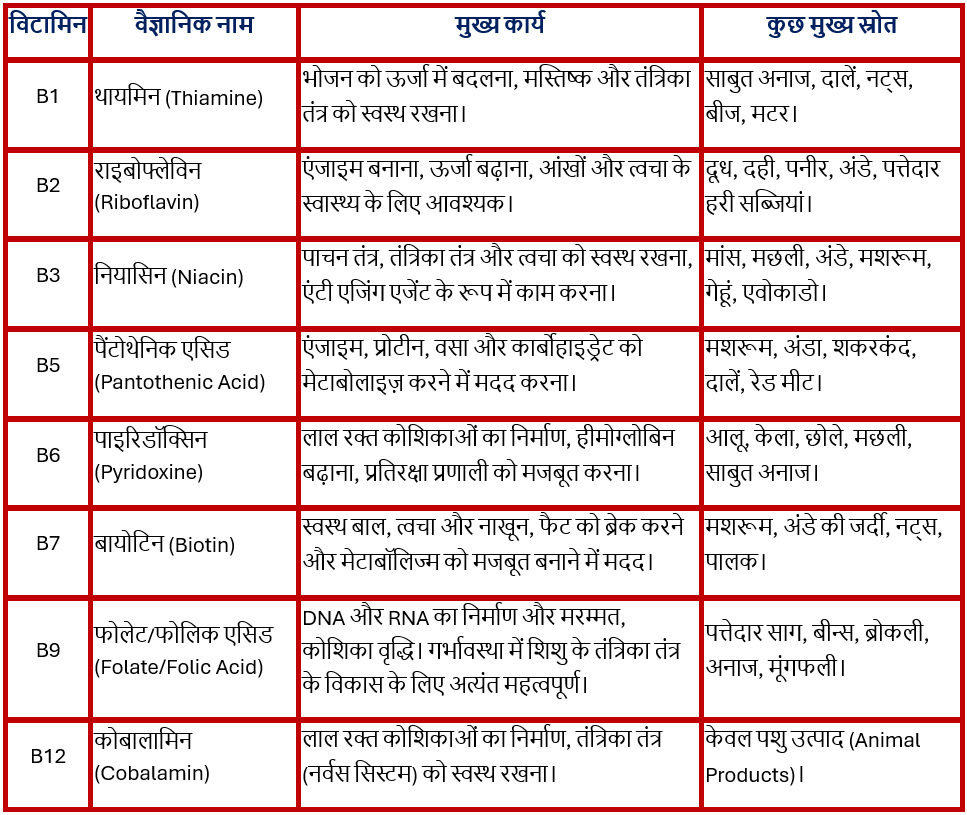
विटामिन B Complex और विटामिन B12


विटामिन बी (Vitamin B) वास्तव में विटामिन बी कॉम्प्लेक्स नामक पानी में घुलनशील विटामिनों के एक समूह को दर्शाता है। यह एक एकल विटामिन नहीं है, बल्कि आठ अलग-अलग विटामिनों का समूह है, जिनमें से प्रत्येक शरीर में विशिष्ट और महत्वपूर्ण भूमिका निभाता है।

विटामिन बी कॉम्प्लेक्स में शामिल मुख्य विटामिन:

विटामिन B1 (थायमिन): ऊर्जा उत्पादन और तंत्रिका तंत्र के कार्य के लिए महत्वपूर्ण।

विटामिन B2 (राइबोफ्लेविन): शरीर में एंजाइम बनाने और ऊर्जा बढ़ाने में सहायक।

विटामिन B3 (नियासिन): एंटी एजिंग एजेंट, पाचन तंत्र और तंत्रिका तंत्र को मजबूत बनाता है।

विटामिन B5 (पैंटोथेनिक एसिड): मेटाबॉलिज्म (चयापचय) में सहायक।

विटामिन B6 (पाइरिडॉक्सिन): लाल रक्त कोशिकाओं के निर्माण और प्रतिरक्षा प्रणाली के लिए महत्वपूर्ण।

विटामिन B7 (बायोटिन): बालों, त्वचा और नाखूनों के स्वास्थ्य के लिए महत्वपूर्ण, मेटाबॉलिज्म को मजबूत बनाता है।

विटामिन B9 (फोलेट या फोलिक एसिड): डीएनए के निर्माण और मरम्मत, और स्वस्थ कोशिका वृद्धि के लिए आवश्यक। यह गर्भावस्था के दौरान शिशु के विकास के लिए अत्यंत महत्वपूर्ण है।

विटामिन B12 (कोबालामिन): यह समूह का ही एक हिस्सा है।

Vitamin B


विटामिन बी12 (Vitamin B12)

विटामिन B12 (कोबालामिन) बी-कॉम्प्लेक्स परिवार का अंतिम और सबसे महत्वपूर्ण सदस्य है। यह अकेला ऐसा विटामिन है जिसमें कोबाल्ट धातु पाई जाती है, जिसके कारण इसे कोबालामिन कहते हैं।

विटामिन B12 के प्रमुख कार्य:

  1. रक्त निर्माण: यह बोन मैरो (Bone Marrow) में लाल रक्त कोशिकाओं (RBCs) के निर्माण के लिए आवश्यक है। इसकी कमी से मेगालोब्लास्टिक एनीमिया होता है।
  2. तंत्रिका तंत्र की सुरक्षा: यह तंत्रिका तंतुओं के चारों ओर सुरक्षात्मक माइलिन शीथ (Myelin Sheath) को बनाए रखने में मदद करता है। तंत्रिकाओं के स्वस्थ कार्य के लिए यह बहुत ज़रूरी है।
  3. DNA संश्लेषण: कोशिका विभाजन और शरीर की वृद्धि के लिए DNA बनाने में महत्वपूर्ण भूमिका निभाता है।
  4. हृदय स्वास्थ्य: रक्त में होमोसिस्टीन (Homocysteine) के स्तर को नियंत्रित करके हृदय रोग के जोखिम को कम करता है।

विटामिन B12 के स्रोत :

विटामिन बी12 का सबसे बड़ा अंतर इसके स्रोतों में है। यह प्राकृतिक रूप से लगभग केवल पशु-आधारित खाद्य पदार्थों में पाया जाता है।

विशेष ध्यान : जो लोग पूर्णतः शाकाहारी (Vegan) हैं या कम मात्रा में डेयरी उत्पाद लेते हैं, उनमें B12 की कमी होने का खतरा सबसे अधिक होता है, क्योंकि पौधों में यह विटामिन प्राकृतिक रूप से नहीं पाया जाता है।

विटामिन B12 की कमी के लक्षण:

कमी के लक्षण धीरे-धीरे सामने आते हैं और अक्सर नज़रअंदाज़ हो जाते हैं:

  • थकान और कमजोरी: लगातार थका हुआ महसूस करना।
  • न्यूरोलॉजिकल समस्याएं: हाथ-पैरों में सुन्नपन, झुनझुनी, या “पिन और सुई” (tingling sensation) जैसी अनुभूति होना।
  • मानसिक स्वास्थ्य: याददाश्त कमजोर होना, भ्रम (Confusion), डिप्रेशन, या मूड स्विंग।
  • एनीमिया: पीली त्वचा, साँस लेने में तकलीफ, या दिल की धड़कन का तेज होना।
  • जीभ की समस्या: जीभ का लाल या सूजा हुआ दिखना (Glossitis)।

यदि आप ‘विटामिन बी’ की गोली लेते हैं, तो वह ‘विटामिन बी कॉम्प्लेक्स’ होती है, जिसमें B12 सहित सभी आठ विटामिन शामिल होते हैं। यदि आप ‘विटामिन बी12’ की गोली लेते हैं, तो आप केवल ‘विटामिन बी12’  की खुराक ले रहे हैं। विटामिन सप्लीमेंट्स लेने से पहले, खासकर अगर आप लगातार थकान या नसों में झुनझुनी जैसे लक्षण महसूस कर रहे हैं, तो सबसे अच्छा है कि आप पहले डॉक्टर से मिलकर विटामिन B12 और B9 (फोलेट) का रक्त परीक्षण कराएँ। आपको डॉक्टर की सलाह के अनुसार विटामिन बी की खुराक लेनी चाहिए।

अच्छे स्वास्थ्य से संबंधित ब्लॉग पढ़ने के लिए हमसे (www.resultplot.com) जुड़ें।

विटामिन E के लाभ और दुष्प्रभाव

विटामिन E एक वसा में घुलनशील (Fat-Soluble) विटामिन है जो शरीर के लिए एक शक्तिशाली एंटीऑक्सीडेंट के रूप में कार्य करता है। विटामिन E के तीन मुख्य कार्य हैं जो इसे शरीर के लिए एक बेहद ज़रूरी पोषक तत्व बनाते हैं:

  1. शक्तिशाली एंटीऑक्सीडेंट

यह विटामिन E का सबसे महत्वपूर्ण काम है।

  • मुक्त कणों से सुरक्षा: विटामिन E एक शक्तिशाली एंटीऑक्सीडेंट के रूप में काम करता है। यह शरीर में बनने वाले फ्री रेडिकल्स  नामक अस्थिर और हानिकारक अणुओं को बेअसर करता है।
  • कोशिका क्षति को रोकना: फ्री रेडिकल्स कोशिकाओं को नुकसान पहुँचाते हैं, जिसे ऑक्सीडेटिव स्ट्रेस कहते हैं। विटामिन E इस स्ट्रेस से कोशिकाओं, खासकर कोशिका झिल्ली की सुरक्षा करता है। यह सुरक्षा पुरानी बीमारियों (जैसे हृदय रोग, कैंसर और अल्जाइमर) और उम्र बढ़ने की प्रक्रिया को धीमा करने में मदद करती है।
  1. रोग प्रतिरोधक क्षमता बढ़ाना

विटामिन E आपकी प्रतिरक्षा प्रणाली (Immune System) को सही ढंग से काम करने में मदद करता है।

  • यह प्रतिरक्षा कोशिकाओं  के उत्पादन और कार्य को बढ़ावा देता है, जिससे शरीर संक्रमणों, कीटाणुओं और वायरस से अधिक प्रभावी ढंग से लड़ पाता है।
  1. रक्त और हृदय का स्वास्थ्य

विटामिन E रक्त संचार और रक्त वाहिकाओं को स्वस्थ बनाए रखने में महत्वपूर्ण भूमिका निभाता है।

  • यह रक्त वाहिकाओं को चौड़ा रखने में मदद करता है और रक्त के थक्के (Blood Clots) बनने से रोकने में सहायक हो सकता है, जिससे हृदय रोग का खतरा कम होता है और सही रक्तचाप (Blood Pressure) बनाए रखने में मदद मिलती है।

विटामिन E अपनी एंटीऑक्सीडेंट प्रकृति के कारण त्वचा और बालों के लिए भी बहुत फायदेमंद है:

  • त्वचा को पोषण: यह त्वचा को नमी  प्रदान करता है, रूखेपन को कम करता है, और झुर्रियों की उपस्थिति को कम करने में मदद करता है।
  • बालों की मजबूती: यह स्कैल्प में ब्लड सर्कुलेशन को सुधारता है, जिससे बालों की जड़ों को पोषण मिलता है और बालों का झड़ना कम हो सकता है।
  • आंखों का स्वास्थ्य: यह आंखों की रोशनी और ऊतकों की सुरक्षा के लिए भी आवश्यक है।

विटामिन E का  स्रोत (Source)

विटामिन E वसा (Fat) में घुलनशील विटामिन है, इसलिए इसके मुख्य स्रोत ऐसे खाद्य पदार्थ हैं जिनमें स्वस्थ वसा (Healthy Fats) मौजूद होती है।

विटामिन E के मुख्य और सबसे अच्छे स्रोत इस प्रकार हैं:

  1. वनस्पति तेल (Vegetable Oils)

ये विटामिन E के सबसे समृद्ध स्रोतों में से एक हैं, विशेष रूप से:

  • गेहूं के बीज का तेल (Wheat Germ Oil): यह विटामिन E का सबसे बड़ा स्रोत माना जाता है।
  • सूरजमुखी का तेल (Sunflower Oil)
  • कुसुम का तेल (Safflower Oil)
  • कनोला तेल (Canola Oil)
  • सोयाबीन तेल (Soybean Oil)
  1. बीज और नट्स (Seeds and Nuts)

ये विटामिन E के पावरहाउस हैं, जिन्हें प्रतिदिन खाया जा सकता है:

  • सूरजमुखी के बीज (Sunflower Seeds): ये बहुत अच्छा स्रोत हैं।
  • बादाम (Almonds): यह सबसे लोकप्रिय और समृद्ध स्रोतों में से एक है।
  • हेज़लनट्स (Hazelnuts)
  • मूंगफली (Peanuts)
  • पाइन नट्स (Pine Nuts)
  1. हरी पत्तेदार सब्जियां (Green Leafy Vegetables)

कुछ हरी सब्जियां भी अच्छी मात्रा में विटामिन E प्रदान करती हैं:

  • पालक (Spinach)
  • ब्रोकली (Broccoli)
  • केल (Kale)
  1. फल (Fruits)
  • एवोकाडो (Avocado): यह स्वस्थ वसा और विटामिन E दोनों का अच्छा स्रोत है।
  • कीवी (Kiwi)
  • आम (Mango)
  1. अन्य स्रोत
  • साबुत अनाज (Whole Grains)
  • अंडे (Eggs)
  • फोर्टिफाइड खाद्य पदार्थ: जैसे कि कुछ ब्रेकफास्ट सीरियल्स, फलों का रस, और मार्जरीन जिनमें अलग से विटामिन E मिलाया जाता है।

नोट: चूंकि विटामिन E वसा में घुलनशील है, इसलिए शरीर इसे तब बेहतर ढंग से अवशोषित करता है जब इसे वसा युक्त खाद्य पदार्थों (जैसे कि नट्स, तेल या एवोकाडो) के साथ खाया जाता है।

 विटामिन E की अधिकता से होने वाले मुख्य नुकसान

किसी भी चीज़ की अत्यधिक मात्रा लेने से उसके नुकसान (साइड इफेक्ट्स) हो सकते हैं, और विटामिन E भी इसका अपवाद नहीं है।

जब विटामिन E का सेवन संतुलित आहार से किया जाता है, तो यह आमतौर पर सुरक्षित होता है। लेकिन जब इसे सप्लीमेंट्स (कैप्सूल/गोलियों) के रूप में बहुत अधिक खुराक में और लंबे समय तक लिया जाता है, तो इसके गंभीर नुकसान हो सकते हैं।

विटामिन E के ओवरडोज को हाइपरविटामिनोसिस ई (Hypervitaminosis E) कहा जाता है। इसके मुख्य और गंभीर जोखिम निम्नलिखित हैं:

  1. रक्तस्राव का खतरा (Increased Bleeding Risk)

यह सबसे गंभीर जोखिम है।

  • विटामिन E खून को पतला करने (Blood Thinner) का काम करता है। अत्यधिक मात्रा में यह रक्त के थक्के (Blood Clotting) बनने की प्रक्रिया को बाधित कर सकता है।
  • इससे चोट लगने या सर्जरी के दौरान अत्यधिक रक्तस्राव (Bleeding) हो सकता है।
  • यह खतरा उन लोगों में और भी बढ़ जाता है जो पहले से ही खून पतला करने वाली दवाएं (जैसे Warfarin या Aspirin) ले रहे हैं।
  1. सामान्य शारीरिक दुष्प्रभाव (General Side Effects)

अधिक खुराक लेने पर ये समस्याएं हो सकती हैं:

  • जी मिचलाना (Nausea) और उल्टी (Vomiting)
  • दस्त (Diarrhea)
  • पेट में ऐंठन या दर्द
  • सिरदर्द (Headache) और चक्कर आना (Dizziness)
  • मांसपेशियों में कमजोरी (Muscle Weakness) और थकान (Fatigue)
  1. अन्य गंभीर जोखिम
  • कुछ शोधों के अनुसार, विटामिन E का बहुत अधिक सेवन स्ट्रोक (विशेष रूप से मस्तिष्क में रक्तस्राव) और प्रोस्टेट कैंसर का खतरा बढ़ा सकता है।
  • यह शरीर में विटामिन K के स्तर को प्रभावित कर सकता है।

यदि आप विटामिन E कैप्सूल (जैसे Evion या अन्य) लेने की सोच रहे हैं, तो हमेशा निम्नलिखित बातों का ध्यान रखें:

  1. डॉक्टर से सलाह: सप्लीमेंट शुरू करने से पहले हमेशा डॉक्टर या आहार विशेषज्ञ (Dietician) से सलाह लें, खासकर यदि आपको पहले से कोई स्वास्थ्य समस्या है या आप कोई अन्य दवा ले रहे हैं।
  2. प्राकृतिक स्रोत को प्राथमिकता: अपनी विटामिन E की दैनिक ज़रूरत को पूरा करने के लिए बादाम, सूरजमुखी के बीज, पालक और वनस्पति तेल जैसे प्राकृतिक खाद्य स्रोतों पर निर्भर रहना सबसे सुरक्षित तरीका है।
  3. चेहरे पर सीधा उपयोग: कैप्सूल का तेल सीधा चेहरे या बालों पर लगाने से कुछ संवेदनशील लोगों में त्वचा पर लाल चकत्ते (Rashes), जलन या एलर्जी (Dermatitis) हो सकती है। इसे हमेशा किसी अन्य तेल (जैसे नारियल तेल) या क्रीम में मिलाकर लगाना बेहतर होता है।

विटामिन E स्वास्थ्य के लिए एक आवश्यक पोषक तत्व है, लेकिन इसे प्राकृतिक स्रोतों से प्राप्त करने पर ज़ोर देना चाहिए। सप्लीमेंट्स का सेवन हमेशा डॉक्टर की सलाह पर ही करना चाहिए ताकि इसकी अधिकता से बचा जा सके।


अच्छे स्वास्थ्य से संबंधित ब्लॉग पढ़ने के लिए हमसे (www.resultplot.com) जुड़ें।

India vs Australia team announcement for ODI & T20 Series 2025

IND VS AUS

The BCCI has announced India’s squads for the upcoming ODI and T20I series against Australia. Both team will face each other in ODI , T20 and Test series.

Here is the Team announcement :

ODI Team: Shubman Gill (captain), Rohit Sharma, Virat Kohli, Shreyas Iyer (vice-captain), Axar Patel, KL Rahul (wicketkeeper), Nitish Kumar Reddy, Washington Sundar, Kuldeep Yadav, Harshit Rana, Mohammed Siraj, Arshdeep Singh, Prasidh Krishna, Dhruv Jurel (wicketkeeper), Yashasvi Jaiswal.

T20 Team: Suryakumar Yadav (captain), Abhishek Sharma, Shubman Gill (vice-captain), Tilak Verma, Nitish Kumar Reddy, Shivam Dubey, Axar Patel, Jitesh Sharma (wicketkeeper), Varun Chakravarthy, Jasprit Bumrah, Arshdeep Singh, Kuldeep Yadav, Harshit Rana, Sanju Samson, Rinku Singh, and Washington Sundar.

IND vs AUS ODI schedule:

IND vs AUS

From the pace and bounce of Perth to the history of the SCG and the electric atmosphere of the MCG, the India vs Australia 2025 series will take fans on a thrilling journey. Here is the full itinerary.  The Adelaide Oval, Manuka Oval, and The Gabba are all on the itinerary! Prepare for a massive cricketing feast as India tours Australia for a spectacular limited-overs series.

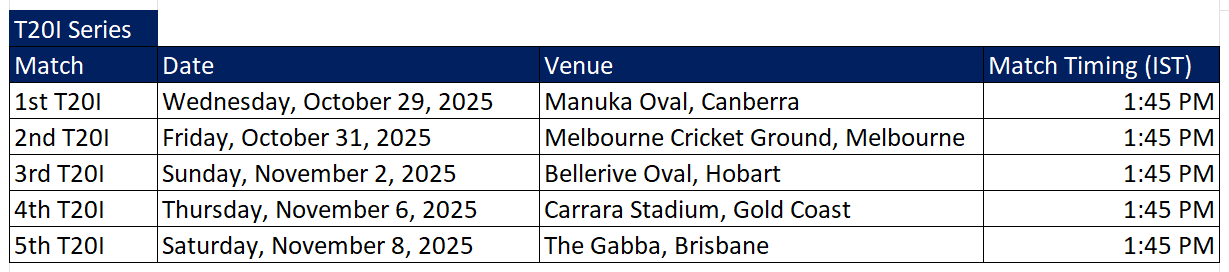
IND vs AUS T20 Schedule:

IND vs AUS T20


The cricketing rivalry between India and Australia is historically intense, with their statistical records varying significantly across formats.

In ODIs, Australia holds a strong historical lead in head-to-head wins, often prevailing in high-stakes World Cup encounters. However, in T20Is, India has demonstrated a clear dominance with a superior win-loss ratio, showcasing their prowess in the shortest format.

Here is the stats :

ODI :- India and Australia have played 152 One Day Internationals (ODIs) against each other. Australia has won 84 matches and India has won 58 matches.10 matches ended with No Result.

T20 :- India and Australia have played a total of 32 T20 International (T20I) matches against each other. India has won 20 matches and Australia has won 11 matches.1 match ended with No Result.


by www.resultplot.com

      India vs South Africa Test, ODI & T20 Series 2025

      IND VS AUS

      The cricket calendar heats up as the formidable South African team tours India for a full-fledged, multi-format series scheduled for November and December 2025. This highly anticipated encounter features a compelling lineup across all three international formats: Test, One Day International (ODI), and Twenty20 International (T20I).

      The tour begins with a crucial Two-match Test series, which forms part of the 2025–2027 ICC World Test Championship cycle, making every session vital for both teams’ standings. The focus then shifts to the white-ball arena with a Three-match ODI series, where both nations will look to assert dominance and fine-tune their squads for future global tournaments.

      Finally, the series culminates in an action-packed Five-match T20I series, a critical fixture as both teams ramp up their preparations for the ICC Men’s T20 World Cup in 2026, which will be co-hosted by India and Sri Lanka. This T20 leg offers a vital opportunity for players to cement their spots and adapt to Indian conditions under the spotlight.

      IND vs SA Test ODI schedule :

      IND vs SA test series 2025
      IND vs SA test series 2025

      IND vs ODI T20 Schedule:

      IND vs SA ODI series
      IND vs SA ODI series schedule

      IND vs SA T20 Schedule:

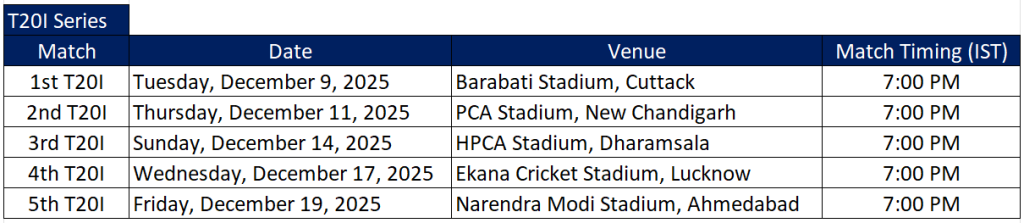
      IND vs SA T20
      IND vs SA T20 series

      The nature of the pitches at the venues for the India vs. South Africa series in late 2025 varies across the different cities and formats, but a general summary is as follows:

      Venue

      Format Typical Pitch Nature Summary
      Eden Gardens, Kolkata Test Historically a decent batting track, but can offer assistance to fast bowlers with the new ball and some turn to spinners as the match progresses. In limited-overs, it is generally considered very batting-friendly with true bounce.
      Barsapara Cricket Stadium, Guwahati Test Known to be a dry, level surface, excellent for batting. Offers minimal assistance to fast bowlers, but spinners can find some turn as the game wears on. It’s expected to be batting-friendly for its debut Test.
      JSCA International Stadium Complex, Ranchi ODI Generally a good batting surface, but not an out-and-out batting paradise. It tends to slow down as the match progresses, offering more grip and assistance to spinners and slow bowlers in the middle overs.
      Shaheed Veer Narayan Singh International Stadium, Raipur ODI Often likened to an excellent sporting surface, it is known for its firm, quick pitch that usually favors good bounce and carry, making it conducive to stroke play.
      Dr. Y.S. Rajasekhara Reddy ACA-VDCA Cricket Stadium, Visakhapatnam ODI The pitch is generally batsman-friendly, promoting high-scoring matches. However, it is also known to assist spinners, and the ball can stay low. Dew can be a significant factor in night games.
      Barabati Stadium, Cuttack T20I Historically an aging pitch that has offered variable bounce and help for spinners. In white-ball cricket, modern pitches have been generally good for batting, with a competitive score often in the 260-280 range (for ODIs), suggesting a good balance for T20Is.
      Maharaja Yadavindra Singh International Cricket Stadium, Mullanpur (New Chandigarh) T20I A relatively new venue known for offering a balanced pitch with good bounce and carry. Pace bowlers can get some initial movement, and spinners are expected to get a decent amount of turn and grip in the middle overs.
      HPCA Stadium, Dharamsala T20I Famous for its altitude and picturesque backdrop. The pitch is often a good batting track, known for its pace and carry which assists fast bowlers initially and helps power-hitting. It has a modern hybrid pitch, which aims for enhanced durability and consistent performance.
      Ekana Cricket Stadium, Lucknow T20I Often produces a slow, low-bounce pitch that favors spin and makes stroke play difficult, though recent reports suggest it has improved to offer an average score in the 160-170 range in T20s. A “slow” surface is generally expected.
      Narendra Modi Stadium, Ahmedabad T20I Generally a balanced wicket but often leans towards favoring the batsmen in limited-overs formats with consistent bounce and true pace. In T20Is, it is a high-scoring ground, but spinners can become effective as the game wears on.

      by www.resultplot.com

          India vs Australia ODI & T20 Series 2025

          IND VS AUS

          The Rivalry returns! India vs Australia ODI & T20 schedule is locked. All eyes on October 2025. Your 2025 cricket plans just got sorted.  Forget everything else. This is the only schedule that matters: IND vs AUS 2025 is coming.

          The battle for cricketing supremacy will shift to Australia’s shores in late 2025. This limited-overs tour promises fireworks, with 3 ODIs and 5 T20Is set to unfold at some of the world’s most iconic grounds. India’s next major assignment in the white-ball format is officially confirmed. Get ready for a high-stakes, action-packed series as the Men in Blue take on the defending champions in their own backyard across eight gripping matches.

          IND vs AUS ODI schedule :

          IND vs AUS
          IND vs AUS ODI Schedule

          From the pace and bounce of Perth to the history of the SCG and the electric atmosphere of the MCG, the India vs Australia 2025 series will take fans on a thrilling journey. Here is the full itinerary.  The Adelaide Oval, Manuka Oval, and The Gabba are all on the itinerary! Prepare for a massive cricketing feast as India tours Australia for a spectacular limited-overs series.

          IND vs AUS T20 Schedule:

          IND vs AUS T20
          IND vs AUS T20 Schedule


          The cricketing rivalry between India and Australia is historically intense, with their statistical records varying significantly across formats.

          In ODIs, Australia holds a strong historical lead in head-to-head wins, often prevailing in high-stakes World Cup encounters. However, in T20Is, India has demonstrated a clear dominance with a superior win-loss ratio, showcasing their prowess in the shortest format.

          Here is the stats :

          ODI :- India and Australia have played 152 One Day Internationals (ODIs) against each other. Australia has won 84 matches and India has won 58 matches.10 matches ended with No Result.

          T20 :- India and Australia have played a total of 32 T20 International (T20I) matches against each other. India has won 20 matches and Australia has won 11 matches.1 match ended with No Result.


          by www.resultplot.com

              India vs West Indies Test Series 2025

              The two-Test match Test series between India and West Indies is going to start from October 2, in which fans will get to see an exciting and competitive cricket.

              The history of cricket is rich with tales of the India-West Indies rivalry, a storied fixture that once represented the ultimate battle between India’s emerging defiance and the fearsome dominance of the Caribbean giants. While the head-to-head records speak of a more balanced past, the modern era is defined by a clear shift in power. As the two-match Test series commences, it serves as a fascinating intersection of contrasting legacies: the Indian team, a formidable force in their home fortress, facing a West Indies side determined to demonstrate progress in their Test resurgence.

              For the hosts, led by the new Test captain Shubman Gill, this series is a crucial assignment in the World Test Championship (WTC) cycle, offering vital points to solidify their position at the top of the table. Their challenge is to maintain the ruthless consistency and intensity that has defined their long-standing home supremacy, particularly on turning tracks that will favor their world-class spin attack. For Roston Chase’s West Indies, the odds are heavily stacked against them, but this tour represents an opportunity for the young squad to play without pressure, focusing on showing sustained character and resilience against spin—the true measure of their ongoing red-ball revival. Ultimately, while the contest may appear one-sided on paper, the series is a stage for both teams to either assert control over their destiny or defy overwhelming expectations.

              IND vs WI schedule

              IND vs WI Test Squad:

              India Test Squad:

              Shubman Gill (Captain) ,Yashasvi Jaiswal, KL Rahul, Sai Sudharsan, Devdutt Padikkal, Dhruv Jurel (WK), Ravindra Jadeja (Vice-Captain),
              Washington Sundar, Jasprit Bumrah, Axar Patel, Nitish Kumar Reddy, N Jagadeesan, Mohammed Siraj, Prasidh Krishna, Kuldeep Yadav

              West Indies Test Squad:

              Roston Chase (Captain), Jomel Warrican (Vice-Captain), Kevlon Anderson, Alick Athanaze, John Campbell, Tagenarine Chanderpaul,
              Justin Greaves, Shai Hope, Tevin Imlach, Alzarri Joseph, Brandon King, Anderson Phillip, Khary Pierre, Jayden Seales
              Johann Layne (Replacement for the injured Shamar Joseph)


              by www.resultplot.com